
Hearing coming up? Start here
Drop in your evidence. Get it in order, fast.
Add your screenshots, photos, recordings and documents, all at once. Custody Commander reads the text in your screenshots, transcribes your recordings and keeps every original untouched. Then you label them and download one numbered exhibit packet to print.
Start free: add your evidence after a quick setup (you can skip it). The free plan holds 10 evidence items, no card; Full Suite is free for 7 days. Self-help software, not legal advice.
Built for one parent. The other parent never has to join, sign up or approve anything.
- Originals kept untouched
- Works in your phone's browser
- Your attorney joins free
How it works, in three steps
-
Drop in your files
Screenshots, photos, voice recordings, videos and PDFs, straight from your camera roll or computer. Pick lots at once, or a whole folder.

-
We read them for you
AI reads the text out of screenshots, photos and PDFs, with a short note on what a picture shows, and transcribes recordings by speaker. Everything lands in one list, sorted by date, with your folders kept.

-
Number, label and print
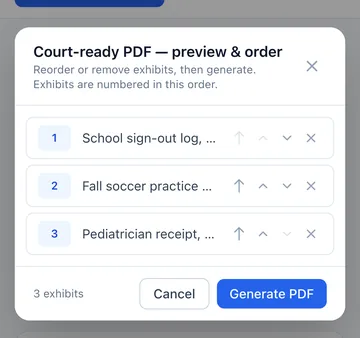
Give each item a date and a short label (or just tell the assistant), put your exhibits in the order you want, and download one PDF with a cover page, contents and numbered exhibits.

App screens from a demo case with made-up names. Every AI reading is a draft you can correct. Text threads? Turn an exported conversation into a numbered log.
Hearing in 7 days?
It isn't too late. One small step a day.
General organizing steps, not legal advice. Your court's own rules come first.
- TodayDrop in everything you have, from your phone or computer. Don't sort first.
- 6–5 days outCheck what the AI read, fix anything that's off, and give each item a date and a short label.
- 4–3 days outChoose what you want with you, put it in order, number it and download your packet. Print it early.
- 2 days outRe-check the date, time and courtroom or video link, and how many copies your court asks for.
- The day beforePack your packet, a photo ID, your notes and a pen. Plan to arrive early.
Everything in one case file
Powerful tools, custom fit to your case
Organize the facts, prepare for court and protect what you send. Use one tool or all of them: they share one case file, and the other parent never has to join.
Organize
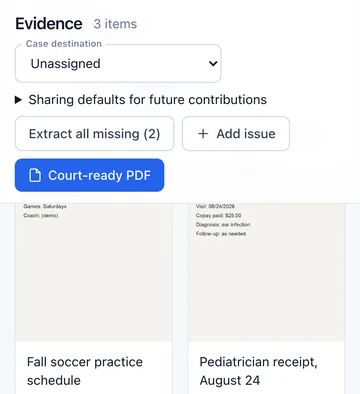
Evidence: drop in your files, print one numbered packet
Drop in the screenshots, photos, recordings, videos and PDFs on your phone, all at once. AI reads the text in your screenshots, with a short note on what a picture shows, and transcribes your recordings by speaker. You check each reading, give it a date and a label, and one click builds the packet.
- A print-ready PDF with a cover page, clickable contents and exhibit dividers, in the order you choose
- A SHA-256 fingerprint for every file. Originals are kept untouched
- Location data removed from photos in the export, plus an evidence index and a ZIP of your originals
Organize
Message logs: thousands of texts, one log anyone can follow
Import the conversation you already have from iPhone, Android, WhatsApp, Messenger or Instagram. Get back a printable, date-ordered log where every message is numbered and dated.
- Numbered from MSG-00001, with the date, time, sender and channel
- A SHA-256 fingerprint on the log, plus a records-declaration template you complete
- Ask questions about a thread. Answers point to the exact message, like [MSG-00042]
Pay $39 once only when you want the final, unwatermarked log. See a sample (PDF) · How it works

Organize
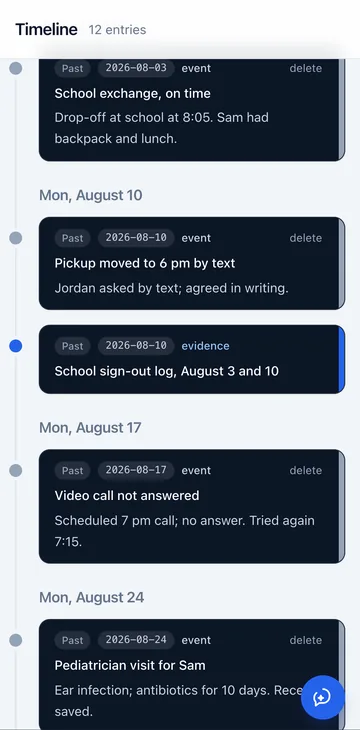
Timeline: every event in order, with the proof attached
Your timeline fills in from dated evidence, hearings and anything you tell the assistant. Group evidence under issues you name yourself, like “Missed exchanges,” so the whole story is easy to follow.
- Exact or approximate dates, notes and the evidence behind each entry
- Issues you define, with evidence mapped to each. The software never picks your arguments
- Export to PDF or Word, or hand your attorney a one-click handoff packet
Prepare
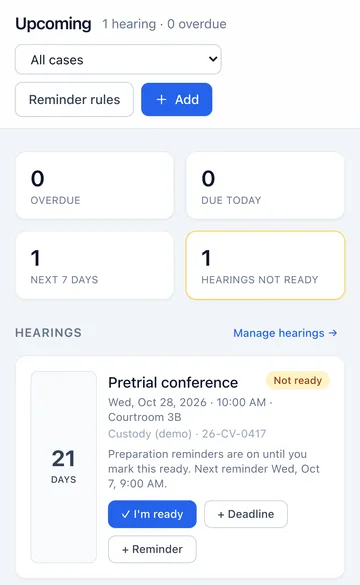
Hearing prep: know what's next, and walk in with it in hand
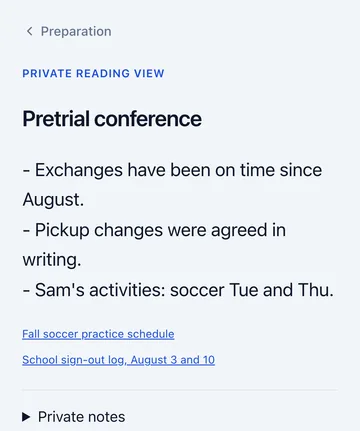
Upcoming counts down to every hearing and deadline and asks if you're ready. Build a tabbed binder in the order you'll present it, and keep your notes in a large-type reading view for the courtroom or a video hearing.
- Countdowns, deadlines and an “I'm ready” check for every hearing
- Reminders by push or email that never show case details on your lock screen
- Hearing binders with tabbed exhibits, in a court copy and a private copy
Prepare
Documents: start from a template, not a blank page
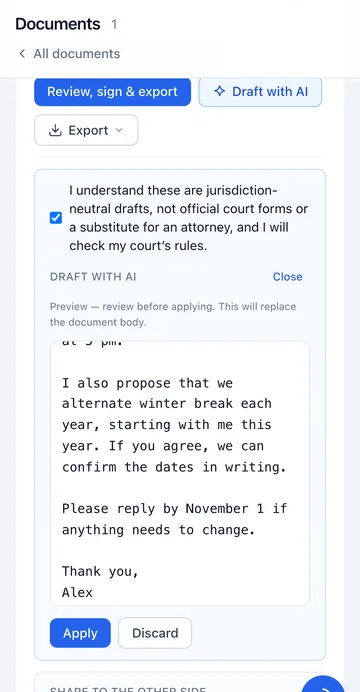
Pick a template (a declaration, a proposed parenting plan, an exhibit list, a hearing prep sheet) or ask for a draft built from your own records. You choose what to write; the software helps you write it.
- [Placeholders] mark what it doesn't know, and export waits until you've filled them in
- Drafts built from your own records, which you check and edit
- General drafts, not official court forms. Check them against your court's own forms and rules
Prepare Paid plans
Mediation Coach: practice the hard conversation before it happens
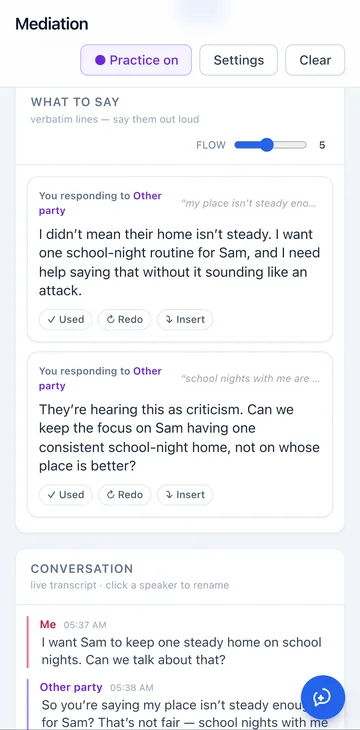
The AI plays the other parent and the mediator, out loud, so rehearsing feels like saying the hard thing for real. When you freeze, “What to say” cards give you calm, word-for-word lines.
- Rehearse out loud, with a live transcript of the practice conversation
- “What to say” cards with calm, word-for-word replies
- Behavioral feedback only. You review and decide everything
Protect
Comms Guard: a calm second look before you hit send
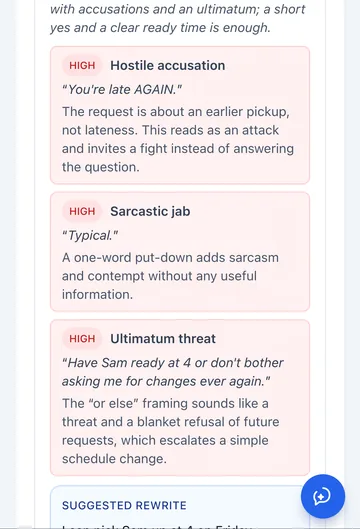
Paste the reply you're about to send. Comms Guard points out hostility, admissions, threats and taking the bait, quoting the exact words and why they read that way, and suggests a short, calm rewrite. Then it logs what you actually sent.
- Flags by severity, with the phrase and the reason
- One tap: “Use this rewrite” — brief, informative, friendly, firm
- Any channel: text, email or a co-parenting app. It never sends anything for you
Protect Free
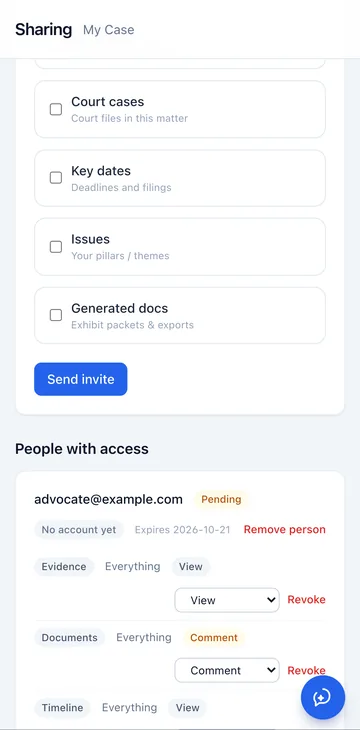
Sharing: bring in your attorney or advocate at no cost
Invite your attorney or advocate and they get a login limited to your case. You choose what they get, category by category: upload only, view, download, comment or edit.
- Free for them, on every plan
- No public links. Nothing is shared until you invite someone by name
- Revoke access at any time. You stay in charge of who sees what
Plus an assistant that runs all of it. Tell it what happened in your own words, and it does the filing. See it work ↓
Why this exists
Built in a real custody fight, by someone who couldn't afford not to build it.
“I had three case numbers running at once, thousands of screenshots, and quotes for more in legal fees than I make in a year. So I built the tools I needed to keep it all straight. Then I realized how many parents are standing exactly where I stood.”
Start here: the Assistant
No forms to learn. Just tell it.
You don't have time to learn software in the middle of a custody case. So Custody Commander has an assistant that works the way you already talk. Say what happened, ask what's coming up, or ask for that one text. It does the filing and shows you exactly what it changed.
Added to your timeline for today (October 7, 2026): Jordan 40 minutes late to exchange.
ADDEDJordan 40 minutes late to exchangeI found three messages between you and Jordan that mention pickup times:
- Aug 10, 2026, 3:02 p.m. ET — WhatsApp, Jordan → Alex: “Can we move pickup to 6 tonight? Work ran late.”
- Sep 1, 2026, 8:00 a.m. ET — WhatsApp, Alex → Jordan: “Confirming Labor Day weekend is with me per our schedule, pickup Friday 5 pm.”
- Oct 5, 2026, 2:10 p.m. ET — SMS, Jordan → you: “Can you do pickup at 4 on Friday instead of 5? I have a work thing.”
That's the full set matching Jordan plus “pickup.” I didn't see replies confirming the Aug 10 or Oct 5 requests in these results.
In the next 60 days (through December 6, 2026), nothing is overdue.
Hearing
Pretrial conference — Wednesday, October 28, 2026 at 10:00, Courtroom 3B, case 26-CV-0417. 21 days away. Not marked ready. Prep reminders are on.
Dated items
Request Sam's school records — due Friday, October 9 (in 2 days).
Exchange exhibit list — due Wednesday, October 21 (in 14 days), tied to the pretrial conference. Your court's rules and any court order control the actual deadline.
The pediatrician receipt (August 24) is now Exhibit 3.
UPDATEDOpen recordThe text from the School sign-out log has been extracted. It is an unverified AI reading of the screenshot, not a user-verified transcript.
Lincoln Elementary student sign-out log:
08/03, 8:05 AM drop-off
08/10, 6:00 PM pickup
Signed: parent on file
The item is labeled “School sign-out log, August 3 and 10,” exhibit 1, event date August 10. You can review the image and correct the extracted text if anything is off.
Saved a short draft letter to Jordan confirming Thanksgiving pickup on Wednesday at 5:00 p.m. It is in your documents and has not been sent. The letter does not name a location or the Wednesday's date, because those were not in your request.
CREATEDLetter to Jordan — ThanksgivingCustody (demo), case 26-CV-0417, has three evidence items on file:
Exhibit 1 — School sign-out log, August 3 and 10 (school-signout.jpg)
Exhibit 2 — Fall soccer practice schedule (soccer-schedule.jpg)
Pediatrician receipt, August 24 (pediatrician-receipt.jpg) — no exhibit number yet
Open your evidence and use Printable PDF export. It numbers the exhibits, embeds the images, and includes each file’s SHA-256.
Real replies from the app, recorded in a demo case with made-up people.
A few more things people ask it
Look at the last three files I added and reference them for my case where it makes sense.
Remind me three days before every hearing.
Add Ms. Lee, the guardian ad litem, to my contacts.
Log that I emailed Jordan the soccer schedule yesterday at 6 pm.
Create an issue called Missed exchanges to group my evidence.
In two sentences, summarize what Jordan and I agreed about Labor Day weekend.
Check my timeline: when was the video call Jordan didn't answer?
Add a deadline to get copies of Sam's report cards by October 20.
Mark the to-do Scan school report card as done.
- Attach a PDF or Word file and ask for a summary
You see what it changedEvery change shows up as an Added, Updated or Created link you can open and check.
Nothing sent, nothing lostIt never sends a message for you, and it asks you to confirm before it deletes a file.
Help with the work, not legal adviceIt organizes, finds, reminds and drafts. It won't tell you what to file or guess how a judge will rule.
An honest comparison
Co-parenting apps need both parents. Custody Commander needs only you.
OurFamilyWizard, TalkingParents and AppClose are built around one shared record, so they do their main job only when both of you use the same app, often by court order. All three are paid now. Custody Commander gives you full value without the other parent joining, agreeing or even knowing, and it starts free.
| Feature |  Custody Commander Custody Commander |
OurFamilyWizard | TalkingParents | AppClose |
|---|---|---|---|---|
| Works if the other parent never joins | Yes.Built for one parent | No.Built around both parents' linked accounts | No.You match accounts with your co-parent | Partly.Solo Mode covers some record-keeping |
| Free plan, no card | Yes.Free plan, plus 7 days of Full Suite | No.Fee waiver if you qualify | No.30-day free trial; fee waiver if you qualify | No.60-day free trial with no card; free accounts if you qualify |
| Price | $0 to startFull Suite $24.99/mo, paid by you alone | $110–$299.88/yrPer parent | $7–$32/moPer parent | $7.99–$8.99/moWeb or in-app billing |
| Turns texts you already have into a numbered log | Yes.iPhone, Android, WhatsApp and more | Records messages sent in the app | Records messages sent in the app | Records messages sent in the app |
| Numbered exhibits, a timeline and hearing binders | Yes.All in one case file | Not listed | Not listed | Not listed |
| AI tone check before you send | Yes.Comms Guard, for texts, email or any app | Yes.Writing Assistant | Yes.On the Ultimate plan | Yes.Co-Parent Assist |
| Shared calendar and tools you use together | Not a shared app. It works alongside one | Yes.Yes | Yes.Yes | Yes.Yes |
Competitor prices and features from each company’s own site as of October 14, 2026. “Not listed” means we didn’t find it on their plans pages. Custody Commander isn’t affiliated with them. Full comparison with sources → · vs. OurFamilyWizard · vs. TalkingParents · vs. AppClose
Pricing
Start free. Pay only if it earns it.
Start on the free tier (10 evidence items, 1 GB of storage) with no card, or try Full Suite free for 7 days and keep it only if it earns it.
Single Product
Just the one tool you need right now.
$14.99/mo
or $119/yr per product
- Any one tool
- 80 AI actions a month for that tool
- Upgrade to the suite anytime
Full Suite
The assistant and every tool, one case file, AI included.
$24.99/mo
or $199/yr — save 33%
- Assistant, messages, evidence, timeline, hearing prep, Comms Guard, documents and Mediation Coach
- 300 AI actions a month
- All your court files in one case file; free attorney & advocate access (on every plan)
Full Suite Max
Everything in Full Suite, for people who lean on the assistant every day.
$99.99/mo
or $899/yr — save 25%
- Everything in Full Suite
- 6,000 AI actions a month: 20× Full Suite
- All your court files in one case file; free attorney & advocate access (on every plan)
Only need your texts? The Message Log Package is a one-time $39, with no subscription. See full pricing →
Your records, protected
Built for the most sensitive files you'll ever keep.
A record of what you uploaded
Every file is SHA-256 hashed at upload, originals are kept untouched, and each item keeps a history of uploads, edits and text extraction. You can show when each file came in and that it hasn't changed since.
Your data is yours
Download your evidence index and a ZIP of your original files, with a manifest, whenever you want. Nothing is shared until you invite someone by name.
Safety-first by default
Two-factor sign-in with recovery codes, one-click sign-out of every device, lockouts after repeated failed sign-ins, and reminders that never show case details on your lock screen. Designed with NNEDV safety guidelines in mind.
On your phone
Works in your phone's browser right now. No app to download.
Open Custody Commander on any phone and your whole case file is there: add screenshots and photos from your camera roll, log what just happened, check a message before you send it.
- Nothing to install. Sign in from any phone, tablet or computer
- No app icon on your home screen. Sharing a phone? Use a private window and sign out when you're done
- One case file everywhere. Start on your phone, finish the binder on a computer
Open it on your phone today
Free plan, no card. Works in Safari, Chrome and other modern browsers.
Start free — no card neededPrefer an app? Get one email when it's out
iPhone and Android apps are on the way, and everything you add now carries over. One email when they're ready. Nothing else.

Free by email
Not ready to sign up? Get the hearing-prep kit.
Printable checklists to organize your own notes and documents before a custody or protective-order hearing, plus up to three short follow-up emails with tips on keeping texts and files in order. They are not court forms and do not say what to file.
- What to gather, and how to date and label it
- Turning texts into a log someone else can follow
- What to print and pack the night before
Prefer to download templates now? Free templates, no email needed.
Email me the free hearing-prep kit
Free guides for parents
Learn the process before you’re in it.
Plain-English guides on evidence, text messages, hearings, mediation and representing yourself, written for parents, not lawyers.
 Evidence & DocumentationAre Text Messages and Screenshots Admissible in Family Court? How to Use Them RightAre text messages admissible in family court? The questions judges ask about texts and screenshots, when screenshots aren’t enough, and how to prepare them.
 Representing YourselfHow to Represent Yourself in Family Court: Custody Without a LawyerHow to represent yourself in family court for custody: what the judge decides, what helps parents without a lawyer, each stage, and organizing your case file.
 Co-Parenting CommunicationThe BIFF Method for Co-Parenting Communication: 8 Heated Texts, RewrittenThe BIFF method for co-parenting communication: how to write Brief, Informative, Friendly, Firm replies by hand, 8 real examples, and a faster way to check.
 Evidence & DocumentationHow to Organize Evidence for Family Court, Step by Step (Free Evidence Index)How to organize evidence for family court: a six-step system, a free evidence index template explained field by field, a filled-in example and a hearing kit.
 Hearings & Court DayThe Night-Before Custody Hearing Checklist: What to Print, Pack and PlanA custody hearing checklist for the last 24 hours: what to confirm, which documents to print, what to pack, what to leave home and how to spend the morning.
 Mediation PrepHow to Prepare for Child Custody Mediation (With a Free Prep Checklist)How to prepare for child custody mediation: learn how your program works, fill in a free prep checklist, build a proposal, and rehearse the hard moments.
Questions, answered straight
Frequently asked questions
Is this legal advice?
No. Custody Commander is self-help software, not a law firm, and does not provide legal advice. It organizes your facts, your documents and your messages. It never tells you what the law means for your situation or predicts how a court will rule. For legal advice, talk to a licensed attorney; the software is designed to make that conversation cheaper and more productive.
Do I need to be good with computers?
No. If you can send a text, you can use the assistant. Type what happened or what you need in plain English, such as “Remind me to request Sam's school records by Friday,” and it does the filing. Every change shows up as a link you can open and check.
Who is this for?
People navigating family court, including protective orders, custody, divorce and support matters, who are representing themselves or who have an attorney but are doing their own legwork to keep the bill down. If your “case file” is currently a folder of 4,000 unsorted screenshots, this is for you.
Does the other parent need an account?
No. Unlike co-parenting platforms that only work when both parties sign up (often by court order), Custody Commander works for you alone. Comms Guard checks and logs what you send, whatever channel the other party uses. Message logs are built from message exports you already lawfully have from your own devices and accounts.
Do I need to download an app?
No. Custody Commander runs in the browser on any phone, tablet or computer, so there's nothing to install and no new app icon on your home screen. Sign in and your whole case file is there, including uploads from your camera roll. iPhone and Android apps are on the way, and everything you add now carries over.
What does the AI actually do?
The assistant files what you tell it, finds things in your case, reminds you and drafts. Elsewhere, AI reads text out of screenshots, transcribes recordings, flags a message that might read as hostile and plays the other side in mediation practice. You stay in control: AI readings are marked as unverified until you check them, every change is shown to you, and nothing is final until you say so. AI can make mistakes, which is why it works this way.
Is my data safe? Can I get it out?
Files are integrity-hashed with SHA-256 at upload, originals are preserved, each item keeps a history of uploads, edits and text extraction, and data is hosted on US infrastructure. You can download your evidence index and your complete Case Bundle — every original file, with a manifest — at any time, free.
Can my attorney use it?
Yes, for free. Invite your attorney or advocate and they get a login limited to your case, with the permissions you choose for each category. Your plan covers the case: storage, evidence limits and export watermarks follow your plan, whoever adds the files, while AI actions come from the allowance of whoever uses them. Your evidence index, timeline and exhibit packets are built to make every paid hour with your lawyer go further.
What's genuinely free?
The free tier gives you one case file with unlimited court case numbers and 10 evidence items, with organizing, tagging and search, watermarked exports and 6 AI actions to try the tools, with no credit card. A new account can also try Full Suite free for 7 days (everything except Mediation Coach, 60 AI actions). The trial needs a card and becomes a paid plan unless you cancel before it ends; cancel online and you pay nothing. Details on the pricing page.
Do I have to use every tool?
No. Use one or all of them. They share a single case file, so evidence you add in one shows up in the others, but each stands on its own. Many people start with a one-time message log or their worst folder of screenshots, and add the rest as the case demands.
The facts are already on your phone. Put them in order.
Start on the free plan today with no card, or try Full Suite free for 7 days. See the difference before you pay a cent.